



🔥 ->~ Networking Part 2. Initialize Network Communication in Windows. C++ ~<-🔥
EASY PEASY! 🔥🔥🔥
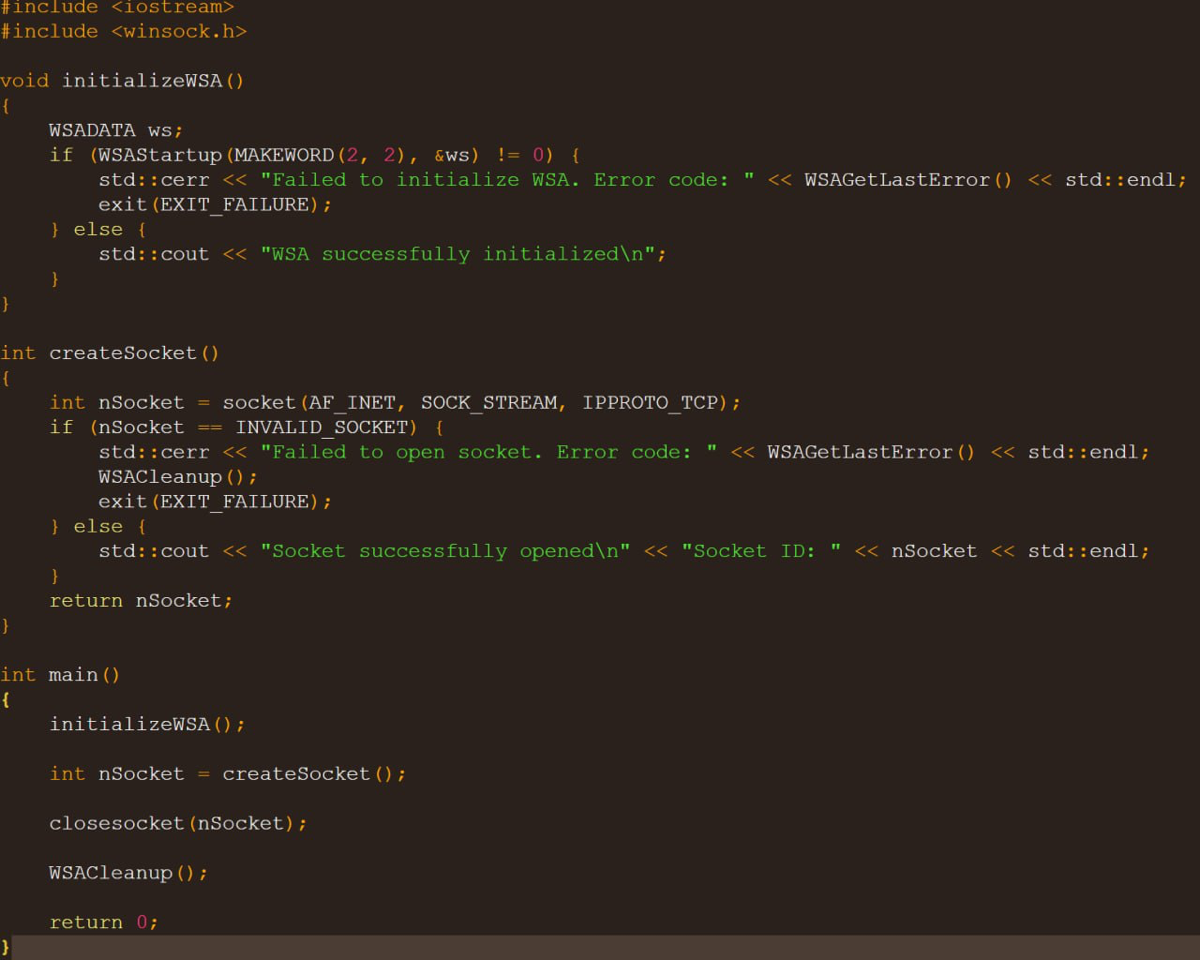
The code in the video is setting up the necessary components for network communication in a Windows environment, we are performing two tasks:
✔️ 1) Initializing the Windows Sockets API (WSA): our code checks if the initialization is successful and prints a message indicating whether it succeeded or not..
✔️ 2) Creating a Network Socket: the code attempts to create a socket for network communication using the TCP protocol.
In short, these components are required for network communication and for any program that intends to send or receive data over a network.
</> Code:
❗️ WSADATA ➡️ A structure that stores information about the version of Windows Sockets (WinSock). The variable ws will hold the data returned by the WSAStartup function..
❗️ WSAStartup ➡️ A function that initializes the Windows Sockets library. It must be called before using any other Winsock functions.
Two arguments:
⚙️ MAKEWORD(2,2) ➡️ A macro that combines two values into a single word. In this case, we specify that we want to use version 2.2 of the Winsock library.
⚙️ &ws: A pointer to the WSADATA variable where data about the version of the library and other information will be recorded.
💥In addition, please pay attention to these arguments:
⚙️ AF_INET: Shows that the IPv4 address family will be used.
⚙️ SOCK_STREAM: Shows that a stream socket (TCP) will be used.
⚙️ IPPROTO_TCP: Indicates that the TCP protocol will be used.


· 01.07
Сокет открыть много ума не надо. А где, собственно, коммуникация-то?
ответить
коммент удалён
· 01.07
Всему своё время! Сам ещё изучаю плюсы, в сетке лимит на символы, обо всём сразу не расскажешь! Если б видео можно было б грузить, другое дело
ответить
ответ удалён